
TL;DR of Build an App Like Coursera
- To build an app like Coursera, focus on the features that define the learning experience, including course delivery, assessments, learning paths, certificates, mobile learning, and enterprise tools.
- The development process covers choosing your niche and revenue model, securing content partnerships, designing the UX, defining the MVP, testing core workflows, and improving the product after launch.
- For Coursera clone development, choose the right mix of custom technology and third-party services for video, payments, search, analytics, AI, live learning, and security.
- The cost to build an e-learning app like Coursera ranges from $1,000 – $5,000+ for a Coursera clone to $150,000 – $300,000+ for an AI-powered platform, with $2,000 – $15,000+ in ongoing monthly costs.
- Businesses can work with Xpertz.io to create an app like Coursera through ready-made clone software or custom e-learning development, with complete source-code ownership.
Coursera has evolved from a course marketplace into a full-scale learning platform covering courses, specializations, professional certificates, degrees, assessments, & career-focused programs. As of March 2026, it had 205M registered learners and more than 375 university & industry partners.
For businesses planning how to build an app like Coursera, the opportunity is therefore broader than putting video courses behind a login. The product needs well-structured learning paths, instructor & partner management, assessments, credentials, subscriptions, progress tracking, and personalized learning.
Coursera’s use of AI-powered features such as Coach and Role Play also shows how learning platforms are expanding beyond video-based courses. This guide covers core features, development process, technology choices, and cost to create an app like Coursera.
Essential Features for a Coursera-Like Website
A Coursera clone needs features that support multiple learning models and user roles while keeping the learner experience easy to navigate. The right feature set depends on your course format, delivery model, target audience, and priorities for the initial launch.
Here are the key features to consider when you create an app like Coursera:
Features | What To Include | Why It Matters |
Learner Tools | Course search & filters, detailed course pages, video lessons, progress tracking, quizzes, payments, bookmarks, learning history, and completion records. | These features support the core learner journey, from discovering a course to completing it. |
Instructor Tools | Course creation, video & document uploads, lesson organization, quizzes, assignments, grading, learner communication, and performance reports. | A multi-instructor model needs organized tools for creating, managing, and monitoring course content. |
Admin Controls | Course approvals, catalog management, user management, instructor verification, refunds, support tools, reporting, and content moderation. | Centralized controls help maintain content quality, manage users, and handle platform operations efficiently. |
Learning Paths | Curated courses sequences, specializations, skill tracks, prerequisites, and recommended next courses. | Structured paths help learners move from individual courses toward broader skills and career goals. |
Projects & Assessments | Graded assignments, hands-on projects, quizzes, practical labs, and skill assessments. | Practical assessments help learners demonstrate knowledge through applied work. |
Peer Review | Assignment submission, rubric-based evaluation, reviewer allocation, feedback, and grading rules. | Peer assessment can support scalable evaluation while giving learners feedback from other participants. |
Mobile Learning | iOS & Android apps, offline access, synchronized progress, push notifications, and mobile-friendly assessments. | Mobile access lets learners continue courses across devices while keeping their progress synchronized. |
Multilingual Learning | Translated interfaces, subtitles, localized course content, multilingual search, and language-specific learning paths. | Localization allows the platform to serve learners across different regions and languages. |
Business Dashboards | Team enrollment, assigned learning paths, learner progress, skill reports, completion rates, and admin analytics. | B2B customers need organization-level visibility into employee learning and skill development. |
AI-Assisted Learning | AI course recommendations, personalized learning guidance, content discovery, practice assistance, course creation support, and role-based recommendations. | AI can improve personalization and reduce manual work across learning and content workflows. |
Certificates & Credentials | Course completion certificates, shareable certificates, badges, credential verification, and institution-issued credentials. | Verifiable credentials give learners a way to showcase completed learning and skills. |
Government Programs | Organization-wide learning, workforce training, skill development programs, learner enrollment, progress tracking, reporting, and admin controls. | Government programs often require centralized administration, reporting, access controls, and compliance support. |
How to Build an E-Learning App Like Coursera?
Building an e-learning platform like Coursera involves several product and development decisions that need to work together. The 8 steps below outline the process of turning the initial concept into a market-ready learning platform.
1. Define Your Target Audience and Learning Niche
Start by identifying the specific learning need your Coursera clone will address. Your focus could be professional upskilling, technical certifications, higher education, language learning, or workforce training.
Define your core learner, their goals, preferred learning format, and the outcome you want the platform to deliver. For example, Coursera’s Professional Certificates combine job-relevant courses with hands-on projects and career-focused training.
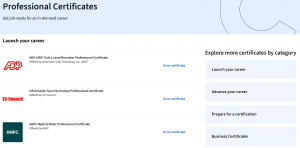
A clearly defined niche gives you a stronger basis for deciding which courses to offer, what content partnerships to pursue, and which features deserve priority in the initial product.
2. Choose Your E-Learning Business Model
Your business model determines how the platform generates revenue and which commercial features your Coursera clone needs. Coursera uses multiple revenue streams, including consumer & enterprise subscriptions, transactional purchases, and degree programs.
Its Q2 2026 results reported $121.7M in consumer subscription revenue and $139.4M from enterprise subscriptions.
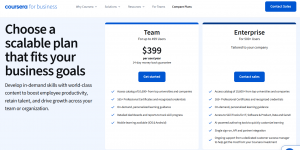
When you build an app like Coursera, select a model that fits your target market and content strategy. Subscriptions can suit platforms with extensive course libraries, while enterprise plans work well for organizations purchasing learning access for teams.
Your choice will shape pricing, payment flows, instructor payouts, access rules, and the commercial features required for launch.
3. Secure Instructors, Institutions, and Content Rights
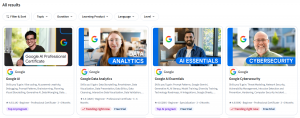
Your course catalog needs both credible educators and legally cleared content. Coursera works with 400+ universities and industry organizations that provide courses, professional certificates, and degree programs.
Before you build an app like Coursera, sign agreements that define IP ownership, licensing scope, distribution rights, revenue sharing, content updates, and termination terms. For third-party courses, specify where the content can be offered, for how long, and under what commercial terms.
If you plan to offer accredited degrees or institution-issued credentials, establish separate agreements covering accreditation, credential issuance, and institutional responsibilities. This keeps content licensing and academic credentials clearly defined within your Coursera clone.
4. Create UI/UX Design
When you build an app like Coursera, the UI/UX should help users find relevant learning content, evaluate courses, and complete key actions with minimal friction. Map the primary journeys for learners, instructors, institutions, & administrators before designing individual screens.
For learners, focus on course discovery, clear program information, consistent navigation, and responsive layouts across web and mobile. Coursera’s course pages provide a useful reference for presenting details such as learning outcomes, syllabus, duration, ratings, and enrollment options.
Build accessibility into the design as well, including captions, keyboard navigation, sufficient contrast, readable typography, and accessible video controls. This becomes increasingly important when your Coursera clone is intended for a broad learner base.
5. Choose the Development Approach for Your Coursera Clone
The development approach you choose will affect your time to market, upfront investment, customization, and ability to extend the product later. For businesses planning to create an app like Coursera, the choice generally comes down to a ready-made Coursera clone or custom eLearning development.
I. Coursera Clone Software
A ready-made clone is suitable when you want to launch with proven E- learning app features such as course management, learner accounts, instructor dashboards, payments, assessments, and certificates.
It can shorten development time and reduce the initial cost, while still allowing branding and selected customizations.
II. Custom E-Learning Development
Custom development is a better fit when your product requires a distinct learning model, specialized workflows, third-party integrations, advanced AI features, or organization-specific requirements.
You have greater control over the product experience, technology choices, and future feature development.
As a leading E- Learning app development company, Xpertz.io offers both clone software and custom Coursera e-learning development. Our team can tailor the learner experience, course management, assessments, payments, certifications, and admin controls to your platform’s requirements, with complete source-code ownership.
6. Build the MVP
When you create an app like Coursera, the MVP should prove that learners can discover, enroll in, and complete courses while giving your team enough data to refine the product. Keep the first release focused on the workflows that directly support learning and revenue.
- Build the Core Learner Flow – Include registration, course discovery, course pages, video lessons, progress tracking, quizzes, payments, and completion records.
- Enable Course Publishing – Provide instructors or admins with tools to create courses, upload lessons, manage assessments, and publish content.
- Implement Your Revenue Model – Support the payment flow selected for your platform, whether it involves individual course purchases, subscriptions, or institutional access.
- Track Key Metrics – Monitor enrollment, lesson engagement, course completion, and payment activity to understand learner behavior and identify drop-off points.
- Phase Advanced Capabilities – Features such as AI tutoring, advanced recommendations, peer assessment, virtual labs, and enterprise analytics can follow once the core learning experience has been validated.
7. Test Learning, Payments, Security, and Accessibility
Testing should mirror real usage across learners, instructors, and administrators before you launch an app like Coursera. Validate the complete learning and payment flows, including enrollment, video playback, progress synchronization, quizzes, assignments, certificates, subscriptions, refunds, and failed transactions.
Test role-based permissions to ensure each user sees only the functions and data assigned to their role. For accessibility, check captions, keyboard navigation, screen-reader compatibility, focus states, contrast, and WCAG requirements across key learning screens.
Finally, conduct load and security testing for concurrent users, video sessions, authentication, and payment transactions. This helps identify performance bottlenecks and security gaps before they affect paying learners or content partners.
8. Launch, Measure, and Improve Your Coursera-Like App
Launch your Coursera-like app with a focused course catalog and a defined acquisition plan instead of opening every category at once. A controlled launch gives you room to monitor real user behavior and address early product or content issues.
Once live, track enrollments, course completion, learner retention, subscription conversions, refunds, instructor activity, and support requests. Review these metrics regularly to identify where learners drop off, which courses perform well, and where instructors encounter publishing or management issues.
Use these insights to refine course discovery, learning flows, pricing, and content quality. As usage grows, you can introduce advanced capabilities such as personalized recommendations, AI-assisted learning, enterprise reporting, and additional credential formats based on validated user needs.
Technology & Integrations You’ll Need To Build Coursera Clone
The technology stack should be selected around the actual learning experience. For a Coursera clone, video delivery, assessments, payments, search, analytics, and AI can each require different technical services.
Technology/Integration | Where it Fits in a Coursera Clone | Relevant Options |
Frontend | Learner, instructor, & admin interfaces, including course discovery, dashboards, lessons, and assessments | React, Next.js, Angular |
Mobile Development | iOS & Android learning apps with synchronized progress and notifications | Flutter, React Native, Swift, Kotlin |
Backend | User accounts, courses, enrollments, assessments, certificates, payments, and business rules. | Node.js, Python, PHP, Laravel |
Database | Learner profiles, course structures, progress, assessments, transactions, and certificates. | PostgreSQL, MySQL, MongoDB |
Video Delivery | Course uploads, encoding, adaptive streaming, playback analytics, and protected content. | Mux Video, AWS Elemental MediaConvert |
Payments & Billing | Course purchases, subscriptions, refunds, invoices, and recurring payments. | Stripe Billing, PayPal |
Search & Recommendations | Course discovery, keyword search, related courses, & personalized recommendations | Elasticsearch or OpenSearch; AI-powered semantic search can use vector embeddings |
AI Learning | Personalized recommendations, learning assistance, content generation, and AI-based guidance. | OpenAI API or another suitable LLM provider. |
Live Learning | Instructor-led classes, webinars, workshops, and live sessions. | WebRTC, LiveKit, Agora, or a video streaming API |
Notifications | Course reminders, enrollment updates, assignment deadlines, certificates, and payment notifications. | Firebase Cloud Messaging, Apple Push Notification service, SendGrid, Twilio |
Analytics | Enrollment, engagement, completion, retention, instructor performance, and business reporting. | GA4, Mixpanel, Amplitude, or a custom analytics layer |
Cloud Storage | Course files, documents, images, backups, application hosting, and data processing. | AWS, Google Cloud, Microsoft Azure, Amazon S3 |
Security | Authentication, role-based permissions, protected video, payment security, and account protection. | OAuth 2.0, OpenID Connect, JWT, HTTPS, signed video URLs, DRM |
How Much Does It Cost to Build an E-Learning App Like Coursera?
The cost to build an app like Coursera depends on the development approach, feature scope, customization, and scale. The following estimates cover common build options, from a ready-made Coursera clone to a fully customized e-learning platform.
Build Type | Estd. Cost | Typical Scope |
Coursera Clone | $1,000 – $5,000+ | Ready-made course management, learner & instructor accounts, payments, quizzes, certificates, and admin panel |
MVP / Basic Custom App | $25,000 – $50,000 | Core learning workflows, customized UI, course management, assessments, payments, certificates, & essential integrations |
Advanced Coursera-Like App | $55,000 – $100,000 | Mobile apps, subscriptions, advanced assessments, live learning, analytics, and third-party integrations |
Custom Enterprise App | $120,000 – $200,000+ | Custom workflows, enterprise learning, advanced reporting, integrations, role-based access, & scalable functionality. |
AI-Powered E-Learning App | $150,000 – $300,000+ | AI recommendations, learning assistants, personalization, AI content tools, and advanced learner analytics. |
Ongoing Costs | $2,000 – $15,000+/month | Hosting, video delivery, storage, APIs, maintenance, security, support, monitoring, and feature updates. |
Ongoing costs also increase as your learner base, video consumption, storage requirements, AI usage, and integrations grow. For a new platform, starting with a focused MVP and expanding based on actual usage can keep both initial and recurring costs manageable.
Build Your Coursera-Like App With Xpertz.io
Knowing how to build an app like Coursera starts with defining the learning experience, monetization model, and features your audience actually needs. You can create your Coursera clone with a focused MVP and expand it with subscriptions, enterprise learning, AI assistance, and advanced analytics as demand grows. As a leading E-Learning app development company, helps businesses build an app like Coursera with ready-made clone software or custom development, offering tailored features, seamless integrations, and complete source-code ownership.
FAQs About Making an App Like Coursera
1. How to build a scalable course delivery system like Coursera?
A scalable course app needs structured content models, adaptive video delivery, progress synchronization, assessment workflows, caching, and analytics. Video services such as Mux support HLS, signed playback, and DRM for protected courses
2. How should certificates and credentials be implemented in a Coursera-like app?
Build credentials around verifiable completion records rather than simple downloadable PDFs. The system can generate unique credential IDs, verification pages, completion criteria, issuer information, and shareable records for learners and institutions.
3. Can a Coursera clone support both web and mobile learning?
Yes! A shared backend can support web and mobile clients while synchronizing enrollment, progress, assessments, certificates, and notifications. The mobile experience should also account for offline learning, device constraints, and mobile-specific interactions.