
TL;DR: Building an Udemy-Like Course Marketplace
- Define your target learners, instructor strategy, pricing, subscriptions, revenue sharing, and other monetization options before building your Udemy-like website.
- Structure the course catalog and build essential features for learners, instructors, and admins, including course discovery, publishing, payments, progress tracking, reviews, analytics, and payouts.
- Make course discovery, enrollment, video learning, progress tracking, payments, communication, and mobile access easy to use while giving instructors the tools to create and manage their courses.
- Creating a website like Udemy can cost around $15,000 – $250,000+ for custom development, while a ready-made Udemy clone script may range from $1,500 – $15,000+.
- Xpertz.io provides both ready-made Udemy clone script and custom developments, allowing businesses to choose a pre-built solution or have the platform developed around their specific requirements.
Udemy’s trajectory demonstrates how online learning can evolve into a scalable and commercially viable marketplace. In 2025, the platform generated $789.8M in revenue, with subscriptions contributing 72% of the total.
It also reached nearly 84M learners, while more than 90,000 instructors offered over 290,000 courses across 78 languages. Even more telling, enrollments in AI-related courses jumped 120% in the same year.
Those numbers explain why businesses want to create a website like Udemy rather than build another standalone course portal. If you are researching how to create an Udemy-like website, this guide covers the business model, essential features, development approaches, costs, and what it takes to build an Udemy clone for a specific market.
What Makes Udemy a Successful Course Marketplace?
Udemy’s success is not driven by course volume alone. Its growth comes from how the platform connects learners, instructors, content, and multiple revenue streams into one business model.
Key factors include:
- Multiple Revenue Streams: Along with individual course purchases, Udemy offers monthly and annual subscriptions. Subscriptions contributed 72% of its 2025 revenue, making recurring revenue a major part of its model.
- Constantly Growing Content: Udemy added an average of 6,300+ new courses each month in 2025, keeping its catalog relevant to changing learner needs.
- Ratings & Reviews: Learner feedback helps users assess courses and gives Udemy signals for identifying stronger content.
- Personalized Discovery: Recommendations and learning paths help learners find relevant courses across a large catalog instead of searching manually.
- Corporate Learning Opportunity: Udemy’s model also extends into workplace training, showing how a website like Udemy can serve both individual learners and organizations.
- Global Reach: Courses are available across 78 languages, allowing the model to serve different markets and giving businesses a proven approach to building a localized Udemy clone.
How to Create a Website Like Udemy?
Building a website like Udemy requires decisions across business strategy, course delivery, monetization, development, and user experience. Here are 10 practical steps to plan and develop an Udemy-like course marketplace.
1. Identify Your Niche and Target Audience
Trying to match Udemy’s course catalog is rarely a smart starting point for a new platform. A better approach is to make an Udemy-like website around a specific market where learners have a clear need.
This could be corporate compliance training, regional-language upskilling, creative arts, medical CE credits, trade certifications, or a professional niche such as legal or finance.
A focused niche helps you sharpen your positioning, pricing, course categories, and instructor strategy while directing marketing spend toward the right audience.
Before deciding what to build, speak directly with potential learners and instructors. Find out what courses they have paid for, where existing platforms fall short, what makes them abandon a course, and what they would actually pay to learn. Combine these conversations with competitor and keyword research to identify gaps worth pursuing.
2. Define Your Course Marketplace Business Model
Once you know who you are building for, decide how the platform will make money and how instructors will earn. Your model should work for both sides of the marketplace and leave enough room for marketing, payment processing, content management, and platform costs.
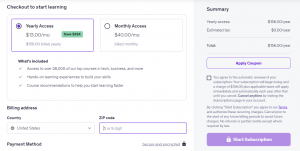
- Subscription Plans: Offer monthly or annual access to a course library. Udemy uses subscription revenue pools, with instructor earnings linked to learner engagement.
- Paid Course Sales: Let learners purchase individual courses and take a percentage of each transaction. Udemy uses this model, with instructors receiving a share of eligible course sales.
- Instructor Revenue Sharing: Decide your commission structure before onboarding instructors. For example, Udemy currently gives instructors 97% of net revenue from sales made through their own coupons or referral links and 37% from sales that do not involve instructor promotions.
- Corporate Learning: Consider a B2B plan where companies pay for employee access to selected courses. Udemy Business is an example of how a consumer course marketplace can extend into corporate training.
- Additional Revenue Channels: Affiliate sales, course bundles, certificates, assessments, or sponsored learning programs can add revenue once the core marketplace is established.
A clear business model will also help you decide which features to build, how to price courses, and how to structure instructor payouts when you create a website like Udemy.
3. Plan the Course Catalog and Content Structure
Once your niche is clear, structure the catalog around how your target learners actually search for and consume courses. A well-organized catalog makes it easier to discover relevant content and gives instructors a clear framework for publishing courses.
- Create Logical Categories: Divide courses into broad subjects, subcategories, skill levels, and specific topics.
- Structure Individual Courses Clearly: Break each course into sections, lectures, and learning activities. Udemy recommends aligning sections with specific learning objectives so every part of the course contributes to a defined outcome.
- Support Different Content Formats: Depending on the subject, allow instructors to use videos, articles, quizzes, assignments, coding exercises, practice tests, labs, and other interactive formats.
- Build Learning Paths: Group related courses into bundles or sequential learning paths so learners can progress from beginner to advanced topics instead of purchasing isolated courses.
- Plan for Content Quality: Define requirements for course length, learning objectives, resources, assessments, and instructor information. Udemy’s course-building guidelines provide a useful benchmark for setting these standards.
A strong catalog structure will also make course search, filtering, recommendations, and personalization easier to build into your Udemy-like website later.
4. Choose How You Will Build the Platform
Once the business model and course structure are clear, choose the development approach that fits your budget, timeline, and level of customization. You generally have two options:
- Custom Development: Build the platform specifically around your niche, workflows, monetization model, and future requirements. This gives you greater control over the user experience and features, but usually requires more development time and investment.
- Udemy Clone Script: A ready-made Udemy clone script provides core features such as course creation, instructor management, payments, revenue sharing, reviews, and learner dashboards, helping businesses launch faster. Xpertz.io provides both ready-made and custom Udemy clone solutions, combining complete source-code ownership with the flexibility to customize the platform to your requirements.
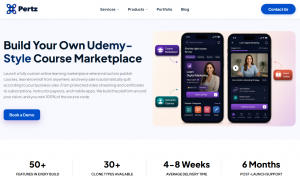
The right choice ultimately depends on whether your priority is faster launch with proven core features or deeper customization for a differentiated marketplace.
5. Design the Website and User Experience
The interface should make it easy for learners to find the right course, understand what they will get, and start learning with minimal friction. At the same time, instructors need a simple way to create, manage, and monitor their courses.
- Keep Course Discovery Clear: Use categories, search, filters, recommendations, and relevant sorting options to help learners find courses quickly.
- Build Informative Course Pages: Include the course overview, learning outcomes, curriculum, instructor profile, ratings, reviews, pricing, and a preview before purchase.
- Create Separate User Journeys: Learners, instructors, and admins should have dashboards designed around their specific tasks.
- Make Learning Easy to Continue: Add progress tracking, bookmarks, completed-lesson indicators, certificates, and course history so learners can pick up where they left off.
- Design for Mobile Users: Ensure course browsing, video learning, payments, and account management work smoothly across smartphones, tablets, and desktops.
- Reduce Checkout Friction: Keep enrollment and payment steps short, clearly display pricing, and support the payment methods commonly used by your target market.

For reference, Udemy’s own course landing page guidelines highlight the importance of clear course information, learning objectives, instructor details, and other elements that help learners decide whether a course is right for them.
6. Build the Core Marketplace Features
Once the UX is planned, build the core features needed to create a website like Udemy. The platform should support the essential workflows for learners, instructors, and admins.
| Student Features | Instructor Features | Admin Features |
| Registration & login | Instructor registration & profile | Student & instructor management |
| Course search & filters | Course builder | Course approval |
| Course preview | Video and resource uploads | Category & subcategory management |
| Course enrollment | Course pricing and discounts | Commissions settings |
| Video learning | Course submission & approval | Payment & payout management |
| Progress tracking | Student engagement tools | Review and content moderation |
| Quizzes & assignments | Sales & revenue dashboard | Course & sales analytics |
| Reviews & ratings | Payout management | Reports & performance analytics |
| Wishlist | Coupons & promotions | Refund management |
| Certificates | Course performance analytics | Notifications & announcements |
| Purchase history | Learner Q&A/discussions | Platform settings & configuration |
| Notifications | Course updates & management | Support & dispute resolution |
A marketplace also needs role-based access, secure payments, notifications, and reporting working across these user areas. These features form the foundation of a functional Udemy clone script, while more advanced capabilities such as AI recommendations, live classes, or gamification can be added based on your niche and business model.
7. Integrate Video Learning, Payments, and Communication
Video learning, payments, and communication are central to how an Udemy-like website delivers courses and generates revenue. Set up secure video hosting with adaptive streaming, playback controls, subtitles, quality options, and resume-from-last-position so learners can continue where they stopped.
Your payment system should support cards, UPI, wallets, and relevant local payment methods, along with coupons, refunds, invoices, taxes, and automated instructor payouts.
You should also include course Q&A, discussions, announcements, and notifications to keep learners connected with instructors.
If your niche requires live teaching, add scheduling, live classes, attendance tracking, and access to recorded sessions. These integrations should be planned around the countries you serve, your payment model, and the type of courses you intend to offer.
8. Add Security and Marketplace Management Controls
Security becomes especially important when your Udemy-like website handles learner accounts, instructor content, payments, and course ownership.
Use secure authentication, role-based access, encrypted data transmission, and controlled access to course content to protect user and platform data.
At the marketplace level, admins should be able to review and approve courses, verify instructors, moderate reviews and reported content, manage refunds and disputes, monitor suspicious activity, and control commissions and payouts.
It is also useful to maintain activity logs and administrative controls so unusual account or payment activity can be investigated quickly. These controls help maintain trust between learners, instructors, and the platform as your marketplace grows.
9. Test and Launch the Platform
Before launching your Udemy-like website, test every major user journey rather than checking individual features in isolation.
Verify registration, course creation and approval, video playback, search and filters, enrollment, payments, coupons, refunds, instructor payouts, progress tracking, certificates, notifications, and admin controls across different devices and screen sizes.
Pay particular attention to payment failures, interrupted video sessions, incorrect course access, and role-based permissions, as these issues can directly affect revenue and user trust.
Run performance and security testing before the public launch, fix critical issues, and consider a limited beta release to collect feedback from real learners and instructors. Once the platform performs reliably, launch it with your initial course catalog, instructor base, pricing, and marketing plan in place.
10. Attract Instructors, Acquire Learners, and Scale
Once you create a website like Udemy, the focus shifts to attracting quality instructors and learners to the platform.
- Attract Qualified Instructors: Offer competitive revenue sharing, promotional support, and easy-to-use course creation tools. Udemy, for example, shares 97% of net revenue on instructor-driven sales and 37% on other eligible sales.
- Build the Learner Base: Use SEO, social media, email campaigns, paid advertising, partnerships, and free course previews to generate initial enrollments.
- Encourage Repeat Learning: Use course recommendations, learning paths, certificates, and personalized offers to bring learners back for additional courses.
- Track Marketplace Performance: Monitor enrollments, completion rates, repeat purchases, instructor activity, customer acquisition cost, and revenue per learner.
- Scale Based on Demand: Expand into related subjects and markets based on learner behavior and course performance. Consider corporate learning plans as the platform matures, following the B2B direction demonstrated by Udemy.
How Much Does It Cost to Create a Website Like Udemy?
The cost to create a website like Udemy depends mainly on the development approach, feature depth, number of user roles, payment integrations, video delivery, and level of customization. A basic marketplace using a ready-made Udemy clone script can cost considerably less than a fully custom platform.
| Development Approach | Estd. Cost |
| Basic Udemy-like website | $15,000 – $30,000 |
| Mid-level marketplace | $32,000 – $70,000 |
| Advanced platform | $75,000 – $150,000 |
| Enterprise-level platform | $160,000 – $250,000+ |
| Udemy Clone Script | $1,500 – $15,000+ |
Beyond development, plan for $1,200 – $15,500+ per month in ongoing costs for hosting, video storage and streaming, maintenance, security, backups, technical support, and third-party services.
Wrapping Up
Creating a website like Udemy is ultimately about building a marketplace that can create value for both learners and instructors. The technology matters, but the bigger decisions are where to compete, how to monetize, what makes the platform worth joining, and how efficiently it can grow. A focused niche and well-planned product can give you a stronger position than simply replicating a broad course marketplace. When the opportunity is clear, the next step is turning the concept into a product that can compete. Xpertz.io provides both ready-made Udemy clone script and custom development, allowing you to choose the route that best fits your business and move towards launch with greater clarity.
FAQs About Building a Website Like Udemy
1. How do I attract instructors to a new Udemy-like platform?
Offer competitive revenue sharing, simple course publishing, promotional support, and access to a clearly defined audience. Early instructor incentives can also help build enough content to make the marketplace attractive to learners.
2. Can an Udemy-like website support both B2C & B2B customers?
Yes! A single platform can serve individual learners through course purchases or subscriptions while offering organizations centralized billing, employee enrollment, learning analytics, team administration, and curated course access through dedicated business plans.
3. Should AI features be included in the first version of an Udemy-like website?
Not necessarily! Core marketplace functions should take priority, while AI can be introduced where it solves a measurable learner or instructor problem. Recommendations, AI tutors, assessments, and content tools can then be added progressively based on platform usage.
4. How can an Udemy-like website compete with industry leaders?
Instead of competing on scale, focus on a specific learner segment, underserved subject, regional market, or unique learning format. Better personalization, instructor incentives, and user experience can create a stronger reason to switch.